Linggo, Enero 15, 2012

VPN UNLIMITED INTERNET TECH SUPPORT

VPN UNLIMITED INTERNET 
TECHNICAL SUPPORT
BY: PISOBILL

UNLIMITED INTERNET UPDATED AS OF: JAN. 13, 2012

line


UPDATED SOLUTION


KONEKTED NASA GLOBE TATTOO BROADBAND USB MODEM AT SA VPN UNLIMITED INTERNET PERO NO BROWSE? KAILANGAN MUNA NATIN I-ACTIVATE ANG GLOBE SIMCARD MO  
(GLOBE PREPAID SIM OR TATTOO SIM)


line


REQUIREMENTS PARA MA-ACTIVATE ANG GLOBE SIM CARD
(ISANG BESES LANG ITO GAGAWIN PAG-ACTIVATE NG SIM CARD)

  1. Two (2) GLOBE SIMS KAHIT LUMA PWEDE PERO MAS OK ANG NEW SIMS NA ANG  EXPIRATION AY MARCH 12, 2012 PATAAS.
  2. 16 PESOS LOAD OR PASALOAD
YUNG SIM#1  ANG I-AACTIVATE NATIN PARA MAKABROWSE KA NG WALANG LOAD AFTER GAWIN ITONG STEPS YUNG SIM #2 PANG CHECK LANG NG BALANCE.  
(PERO HINDI DAPAT NAKAREGISTER SA PROMOS EX. UNLIMITED INTERNET / TEXT ETC.)

line 


STEP BY STEP PROCEDURES:
PLEASE FOLLOW IT CAREFULLY!!!

STEP 1:
ILAGAY ANG SIM #1 SA GLOBE BROADBAND USB MODEM THEN RUN / OPEN GLOBE DASHBOARD. 
(HUWAG I-CONNECT OR I-CLICK ANG KONEK HA!)
 
STEP 2:
PA-LOADAN NG 16 PESOS OR PASAHAN ANG SIM #1 
(WAIT MO MARECEIVE YUNG CONFIRMATION)
 
STEP 3: 
PAGNARECEIVE NA YUNG CONFIRMATION: FROM DASHBOARD WRITE NEW MESSAGE  TYPE MB15 SEND TO 8888 
(WAIT MO YUNG CONFIRMATION)  
THEN CLOSE DASHBOARD THEN RESTART YOUR PC / LAPTOP.
 
STEP 4: 
 INSERT SIM #2 THEN CLICK CONNECT SA DASHBOARD' PAGKONEKTED KA NA TYPE BAL THEN SEND TO 222 
(WAIT MO YUNG CONFIRMATION)
 
STEP 5:
PAGNA-RECEIVE NA ANG CONFIRMATION CLICK DISCONNECT SA GLOBE DASHBOARD THEN CLOSE DASHBOARD
 (HUWAG I-RESTART ANG PC / LAPTOP)
 
STEP 6:
INSERT SIM #1 SA GLOBE BROADBAND USB MODEM OPEN MO YUNG GLOBE DASHBOARD OPEN MO DIN YUNG UNLIMITED INTERNET SOFTWARE AT  PINGER. DOWNLOAD PINGER HERE -
STEP 7: 
 CLICK CONNECT SA GLOBE DASHBOARD THEN CHOOSE SURF SERVERS SA VPN DASHBORAD.
 
STEP 8: 
PAG KONEKTED NA MAGBROWSE NG 3-5MINS SA KAHIT ANONG SITES (EX. FACEBOOK, GOOGLE, YAHOO ETC.) THEN MAG-YOUTUBE OR MAG-DOWNLOAD  HANGGANG MA-EXCEED MO ANG 20MB LIMIT NG PROMO.

  •  BROWSE KA LANG UP TO ONE HOUR OR IT'S UP TO YOU KUNG MAGDAMAG KA ONLINE PAGNAG-TEXT NA EXPIRED NA ANG MB15 MO TRY MO MAG-RESTART THEN KONEK KA ULIT PAG-NAKAKABROWSE KA ACTIVATED NA YANG SIM MO!
  • MAS OK DIN KUNG KONEKTED KA SA UNLIMTED INTERNET PAGMALAPIT NA EXPIRATION NG MB15 PROMO.
  • PAG NO BROWSE KA PA RIN WAIT MO NALANG MATAPOS ANG ONE DAY PROMO NG MB15 THEN TRY MO ULIT YUNG STEPS OR TRY SA IBANG SIM  (YUNG IBA SA PANGATLONG TRY DUN LANG NA-ACTIVATE SIM NILA)
  • PAG LOADING LANG ANG UNLIMITED INTERNET DISKONEK MO YUNG GLOBE DASHBOARD AND UNLIMITED INTERNET SOFTWARE. KONEK MO ULIT ANG GLOBE DASHBOARD (AFTER NG AUTHENTICATING) ISABAY MO AGAD IKONEK ANG UNLIMITED INTERNET NG MABILISAN (NASA TIMING DIN YAN NG PAGKONEK).

 SA MGA RESELLERS: PAG MAY NAG-INQUIRE SA INYO PERO NAKAREGISTER SILA SA UNLIPROMO NG GLOBE WITHIN THAT DAY PWEDE NIYO IPATRY KUNG MAKAKABROWSE SILA MAS OK KUNG YUNG TIME NA MALAPIT NA MAGEXPIRE UNLI NILA KONEKTED SILA SA UNLIMITED INTERNET SOFTWARE NATIN PERO KUNG HINDI WAIT NILA  MAG-EXPIRE UNLISURF NILA PARA MATRY ANG STEPS SA TAAS. 

line

WANT NO EXPIRY LOAD SA SMART?
TEXT WALLET SEND TO 7532


line
 
 HOW TO UNBLOCK SIM BLOCKED:

   1. SA MGA BLOCKED SIM PO ITO / OR HINDI PA BLOCK
LAHAT PWEDE PO SMART OR TALK N TEXT PWEDE!

     2.  ROAM OFF -> SEND TO 333 -> [BLOCK SIM ONLY]
 
3. ALISIN ANG SIM NA BLOCKED SA KIT FOR ONE MINUTE -> THEN UNPLUGGED THE MODEM -> THEN KONEK MO ULIT! PRESTO OK NA SIM MO!


Sabado, Disyembre 31, 2011

JustBeenPaid Investing Tutorials

JustBeenPaid Tutorials JSS3 Tripler!


As of: Wednesday, December 28, 2011

(^_^) JBP/JSS - Exciting Tuesday Update!

Welcome to all our new members!

Great news! The first part of the JSS-Tripler
Pay-It-Forward System has been implemented!
All members who create their JSS-Tripler
accounts for the first time get "$10 free
money" in their JSS-Tripler accounts. They
can immediately buy a JSS-Tripler position
and start earning 2% per day!

So you can tell your prospects that if they
create their new JSS-Tripler accounts, they
get "$10 free money" to get started. (Note
that after 60 days their JSS accounts will
be debited with $10.)

This can become very profitable for our
promoters, because you automatically
get $1 every time your prospect buys a
JSS-Tripler position!

We expect to implement the second part
of the JSS-Tripler Pay-It-Forward System
tomorrow. This will provide "$10 free
money" to all existing JSS-Tripler accounts
for which no JSS-Tripler positions have
been bought.

A reminder that if you're planning on
making a withdrawal to any of our payment
processors for the first time, please use
that processor to fund your account first,
even if it's for a small amount. This will
make it easier for our support staff and
may also result in your withdrawal being
paid sooner.

We use the following payment systems:

http://www.alertpay.com/?97409

http://www.libertyreserve.com/?ref=U0107957

http://solidtrustpay.com/?r=28815

JSS-Tripler now has 54,979 members,
growing by about 700 new members a day.
An important reason for this is that
the JSS-Tripler / JSS combination is
an indefinitely sustainable system:


Part of the "withdrawal balancing
system" is to charge different
withdrawal fees -- currently:
AlertPay - 8%
SolidTrust Pay -2%
Liberty Reserve -2%

Working for our wealth and success,

Frederick Mann

P.S. I challenge you to find any program
that's easier to make money with than
JSS-Tripler.

P.P.S. JSS-Tripler is likely to become
"the program everyone in the know joins."
If you join immediately, you can tell
your friends and contacts about it...
before they join under someone else.  


$ $ $ $ $ $ $ $ $ $ $ $ $ $ $ $ $ $ $ $ $ $ $ $ $ $ $ $ $ $ $ $ $ 


In JSS Tripler, your money will be tripled. You will keep on earning
without doing anything!

* Note 1: *

* Minimum investment is only $10.00
* Each jss tripler position will earn you 2% daily for 75 days
* Much better if you invest in multiples of 4 jss tripler positions
* After the 75th day, your 4 jss tripler position will expire and will be
automatically converted into 1 jss matrix position
* If 1 jss matrix position will cycle, u will earn instant $ 60.00
* You will break even on the 50th day (example, if u invest 10 dollars, on
the 50th day, u will have 10 dollars == 50 days x $0.20 daily income =
$10.00)

Ok, here it goes,

If u invest only $10.00, u will earn $0.20 everyday.
On the 50th day, u will have $ 10.00 (50 days x $ 0.20 = $ 10.00)
On the 75th day, u will have $ 15.00 (75 days x $ 0.20 = $ 15.00)
And the position will stop earning.

If u invest $ 40.00, u will earn $ 0.80 everyday
On the 50th day, u will earn $ 40.00 (50 days x $ 0.80 = $ 40.00)
On the 75th day, u will earn $ 60.00 (75 days x $ 0.80 = $ 60.00)
This 4 jss tripler positions will stop earning the 2% income, and this 4
tripler positions will automatically be converted into 1 JSS SYNERGY MATRIX
POSITION.

* Note 2: *
If your 1 jss synergy matrix position cycled, you earn $ 60.00
And in that way your 40 dollars investment will become 120 dollars
(So your investment is tripled $40 x 3 = 120 dollars)
(75 days total earnings = 60 dollars + 1 cycled jss synergy matrix position
= 60 dollars = 120 dollars total earnings)

       This is very exciting... for example:
               If u invest $10, u earn $ 0.20 daily
               If u invest $20, u earn $ 0.40 daily
               If u invest $30, u earn $ 0.60 daily
               If u invest $40, u earn $ 0.80 daily
               If u invest $50, u earn $ 1.00 daily
               If u invest $100, u earn $ 2.00 daily
               If u invest $200, u earn $ 4.00 daily
               If u invest $1,000, u earn $ 20.00 daily

       The more JSS TRipler positions you buy, THE HIGHER DAILY EARNINGS YOU WILL GET!


$ $ $ $ $ $ $ $ $ $ $ $ $ $ $ $ $ $ $ $ $ $ $ $ $ $ $ $ $ $ $ $ $ 

Steps How To Join and Investing in JustBeenPaid:
-------------------------------------
* First Sign Up to have your own JSS Account!


Then Please Follow Instructions:

1. Log in to your JSS Account.
2. Click JSS TRIPLER button (color blue button on the left side)
3. Click the button –>  Enter Member Area
4. Then u will see the JSS Tripler Quick Start Steps (on the left side)
- Follow the steps properly:
       1. Fund Jss Account.
       2. Transfer funds from JSS Account to JSS Tripler Account.
       3. Buy JSS Tripler positions.
5. After buying your JSS Tripler position... you can now sit back and
relax. And watch your investment earn 2% daily ^^,

Just view your JSS Account everyday or in your spare time and look your earnings keep on multiplying everyday without doing anything! This is already proven true and legitimate...

Congratulations & Happy Earnings Everyone!

TRUE FINANCIAL SUCCESS IS WAITING FOR YOU!

 This information, including that in any attachments, contained in this
email is privileged and confidential. It is intended solely for the
addressee. If you are not the intended recipient please notify the sender
immediately and delete this message. Any review, dissemination,
distribution, copying or other use of this communication or the information
in it is strictly prohibited. We advise you to carry out your own virus
check before opening any attachment as PNB cannot accept liability for any
damage sustained as a result of any software viruses.


Martes, Disyembre 20, 2011

PisoBill.TechSupport 6

VPN UNLIMITED INTERNET TECH SUPPORT

by: PisoBill


How to speed up your Globe Tattoo 3G / 4G Internet Speed

 
Here is a simple guide to help your Globe Tattoo internet at least at a reasonable speed.

- Use internet.globe.com.ph APN if you are a Postpaid subscriber, http.globe.com.ph APN for Prepaid. There are some sources saying that game.globe.com.ph can be used as Prepaid APN (access point name).
- Use a DNS service. This would make your access to web pages quicker by serving you a “cached” version of the site on subsequent page loads.
To use DNS, follow this step:
1. Click Tools and select Options, Profile Management.
2. Edit the “Globe Broadband – Prepaid” configuration. You can then modify the APN if you want to try the game.globe.com.ph
4. Then select Advanced tab. Under the DNS settings, select static and input 4.2.2.1 as the primary DNS, then 4.2.2.2 as the secondary DNS.
5. You can also change Authentication Protocol Settings to PAP (some say it can solve the Error 619 problem)
6. Click Ok, Set as Default and then Save.
You can also try the following DNSes:
Primary: 202.52.162.39
Secondary: 202.52.162.40
Primary: 202.126.40.5
Secondary: 202.95.226.66
Primary: 202.95.226.66
Secondary: 202.95.226.77
Primary: 202.52.163.6
Secondary: 202.52.163.7


How To Boost Globe Tattoo 3G / 4G Signal

 
The following self-help guide will make your Globe Tattoo broadband signal reception better, so you could surf the internet faster.

How to boost your Globe Tattoo broadband 3G signal:
- You must set the network type to WCDMA / 3G / HSPA+ only. This will lock the signal reception to that signals, so it will be stable rather than your broadband kit having to autodetect the signal reception and possibly locking to the GSM / GPRS / EDGE which are slower. This is only applicable if you have WCDMA / 3G / HSPA+ steady signal. If not, then you could just opt for WCDMA / 3G / HSPA+ preferred.
- Use the “signal booster” trick. Its pretty easy. You can use a compact disc to act as a “dish” for your broadband USB (screenshot below):

globe tattoo cdrom dish

 *Note: Buy usb extension 2.0 about 3 - 5 mtrs. color blue transparent, connect it to your PC & the other end to your Broadband then hang it to your window / door or somewhere in an open space.

Biyernes, Disyembre 9, 2011

PisoBill.TechSupport 5

 VPN UNLIMITED INTERNET TECH SUPPORT 

by: PisoBill


TECH SUPPORT FOR SIM BLOCKED USING SMARTBRO BROADBAND USERS


PARA SA MGA SMARTBO USERS NA NA-BLOCKED ANG SIMCARD, PLS READ FOR YOUR INFORMATION:


MAY ISSUE NGAYON ANG SMART NA PAG NAG EXCEED SA LIMIT NILA 700MB/ DAY NATRA-TRACE AT BINA- BLOCK ANG SIM. BAKIT NATRA-TRACE NILA, GAMIT KASI NATIN ANG SMART BUDDY SIM. PANG CP O CELLPHONE PO YAN KAYA ANG LIMIT NYA PANG CP CONNECTION LANG. KAYA PARA MAIWASAN ANG GANITONG ISSUE MERON KAMING MGA TIPS AT TECH SUPPORT NA TEST NA NAMIN AT WORKING GUMANA  PO SA AMIN, PAKI-  TRY NIYO PARA DIRE-DIRETSO ANG CONNECTION AT HINDI NA KAILANGAN MAGPALIT PA NG  SIM CARD.


ERRORS SA MGA NA-BLOCKED NA SIM: 
 
1. DI GUMAGALAW ANG DATA RECEIVED ALWAYS       STOCK LANG SIYA SA 29 OR 32KBPS.

2. CONNECTION TO THE REMOTE CONTROL COULD NOT BE ESTABLISH (PWEDE RIN ANG ERROR NA ITO WALA NG LOAD ANG SMART NIYO (TXT BRO BAL SEND 2200), PERO PAG MERON NAMAN LOAD, BLOCKED NA SIM NIYO.


TIPS PARA DI MA BLOCK ANG SMART BUDDY SIM

1. Huwag masyadong gumamit ng youtube, video streaming or online games..
2. Kung mag-download ng malaking files. I monitor ang mbps nyo na di mag eexceed sa limit ng smart, kung ilang mbps di naman alam, try pausing your download and reconnect your smartbroadband at resume na lng po once na connected na.
3. Try reconnecting every 1 hr.


HOW TO FIX BLOCKED SMART BUDDY SIM 

Answer: Re-instal mo muna lahat software ng vpn, smartbro dashboard, clean history and registry. Punta ka sa Start menu - all programs - accessories - system tools - disk clean up. Pwede din kayo gamit application program like TuneUp Utilities 2012 for clean up system registry. Then follow this steps.

Before doing this make sure connected na broadband mo:

1. Run CMD - (click start menu - click run- type ipconfig - click ok)
2. Type ipconfig
3. Sa blocked sim ito ang ip na lumalabas 10.156.xxx.xxx
4. Isalpak nyo ang sim sa cellphone niyo.
5. Then txt GPRS ON sa 333, hintayin mong mag reply ang smart na activate na ang GPRS nyo sa mga blocked sim na activated na ang GPRS i-off nyo muna txt GPRS OFF sa 333 then send GPRS ON sa 333 (pag hinihingi ang model ng phone, sundan nyo na lng po instructions ng smart).
6. Insert nyo na ngayon sa broadband nyo ang simcard then click connect.
7. Pag connected na punta ka ulit sa start menu run CMD type ipconfig.
8. Tingnan mo ang IP (internet protocol) mo pag di na ganito 10.156.xxx.xxx ok na sya.
9. Mag connect ka na ulit sa vpn!


PAG-AYAW PARIN GUMANA ITO PO SOLUTION B: 
Solution #1. Use (APN) globe access point: From Globe DashBoard 
                 (Click Tools - Click Options - Click Profile Management)
                 type this in your broadband settings under APN
                 http.globe.com.ph
                 or
                 internet.globe.com.ph
                 or
                 UDP

                 Access Number: *99# 
                 Click Save & Set as default
                 Note: Smart Buddy Sim maintain kahit P1 load.

Sa may Connecting Problem na Error 619: Pls refer to my PisoBill.TechSupport 6


 NOTE:  

CREDIT ITO SA MGA NAGBIGAY NG USEFUL TIPS: 
TESTED NA PO NAMIN NA GUMAGANA, I-TRY NIYO KUNG PWEDE RIN SA INYO. WE ARE GIVING YOU THE BEST GUIDE & HELP WE CAN GIVE. DO THIS AT YOUR OWN RISK. PLEASE LEAVE A MESSAGE AFTER DOING THIS IF WORKED FOR YOU OR NOT AND WE WILL FIND MORE UPDATED SOLUTIONS. 


 THANK YOU FOR YOUR COMMENTS & CONCERNS.


Lunes, Disyembre 5, 2011

PisoBill.TechSupport 4


VPN UNLIMITED INTERNET 
TECH SUPPORT

by: PisoBill


VPN UNLIMITED INTERNET 
OPENLINE INSTRUCTIONS

TO UNLOCK MODEMS HERE ARE THE STEPS PLEASE READ CAREFULLY ONE MISTAKE MIGHT BRING DAMAGE TO YOUR BROADBAND:


Tuesday, Dec. 06, 2011

UNLOCK SMARTBRO ZTE MF627 FULL GUIDE!

Note: Habang naguupdate siya wag tatanggalin ang modem at di dapat magbrownout' possibleng masira ang modem mo pag ganun ang nangyari mo'

download first the software to be need:

1. http://www.mediafire.com/?jonzmknujmz
(eto ung pang upgrade for sandbox)
2. http://www.4shared.com/file/60wgQEjK...ykRet19th.html
(this is the files to be past later)

INSTRUCTIONS:

0. Dapat nakatanggal yung sim ng smartbro mo wala dapat nakalagay, and open mo smart dashboard mo'

1. RUN (DL_MF627_SMART_PH_EUV1.00.02.exe) upgrade for sandbox &wait till it recognize your kit & DON'T CLOSE.....

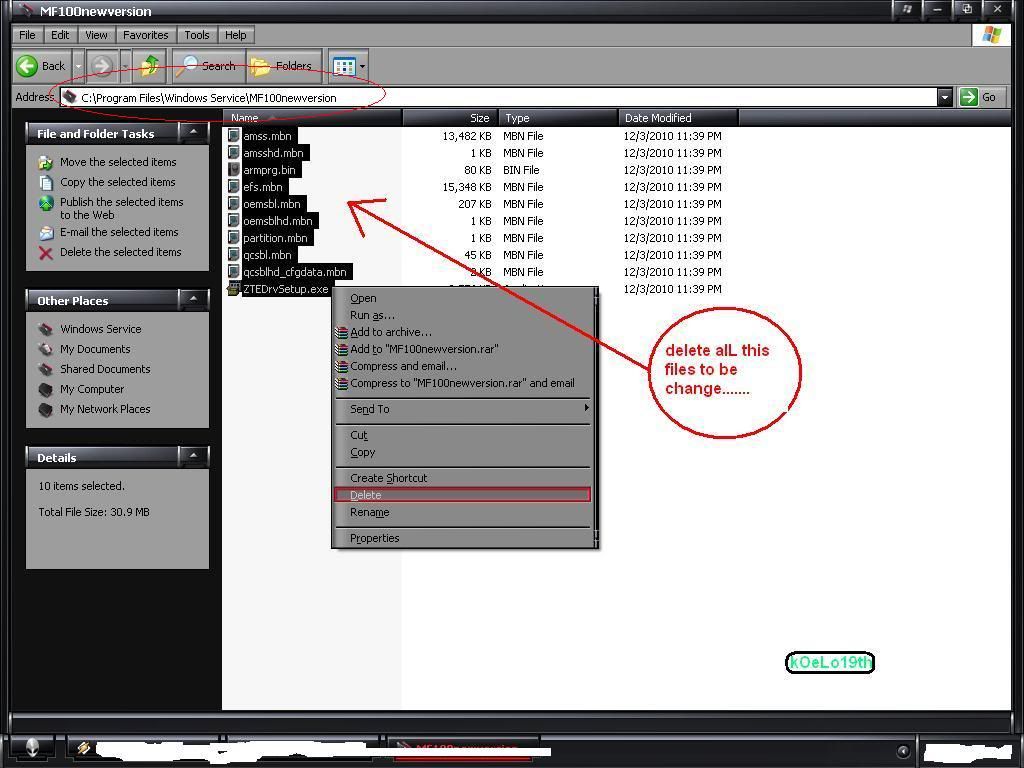
2. GOTO C:\Program Files\Windows Service\MF100newversion folder & DELETE ALL FILES...KAILANGANG WALANG MATIRA
This image has been resized. Click this bar to view the full image. The original image is sized 1024x768.


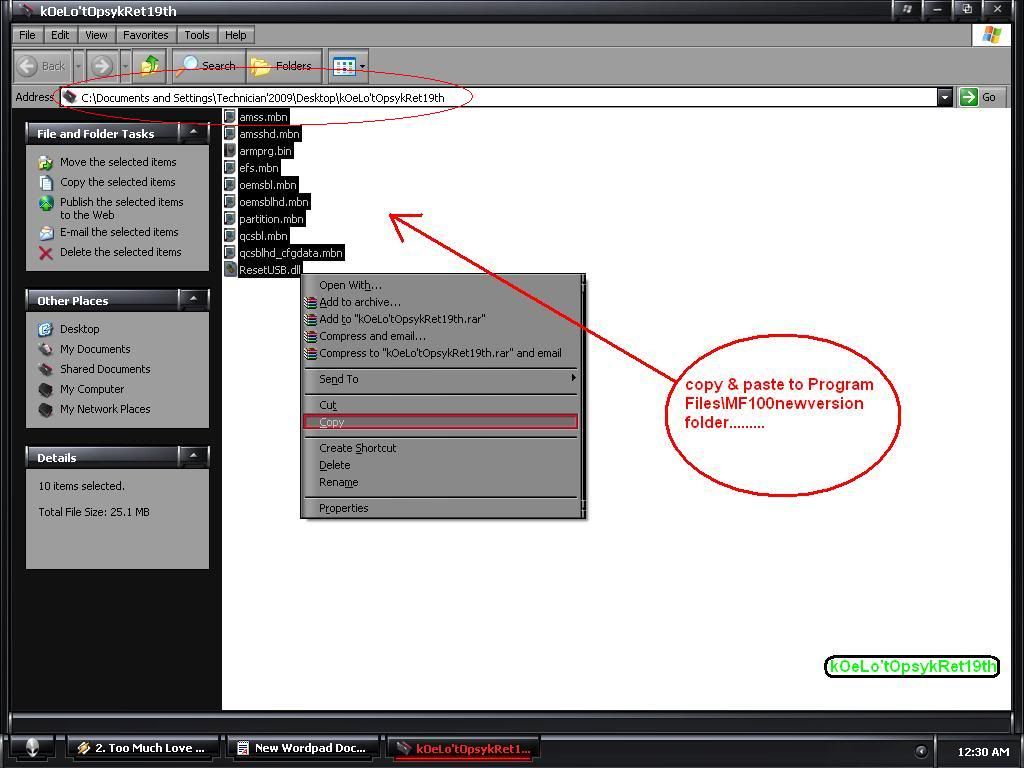
3. GO TO THE FOLDER THAT YOU DOWNLOAD EARLIER AND COPY ALL FILES AND PASTE IT TO C:\Program Files\Windows Service\MF100newversion folder & and remember to close all folder before doing step 4......

This image has been resized. Click this bar to view the full image. The original image is sized 1024x768.


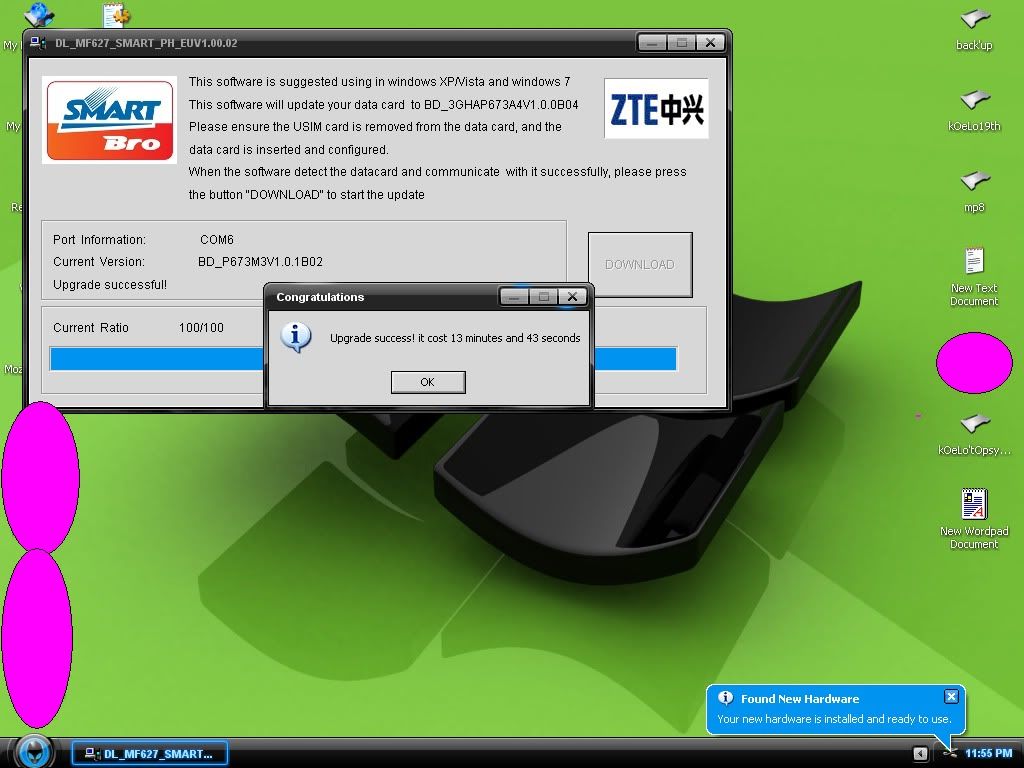
4. TICK DOWNLOAD BUTTON AND WAIT TILL FINISH

This image has been resized. Click this bar to view the full image. The original image is sized 1024x768.


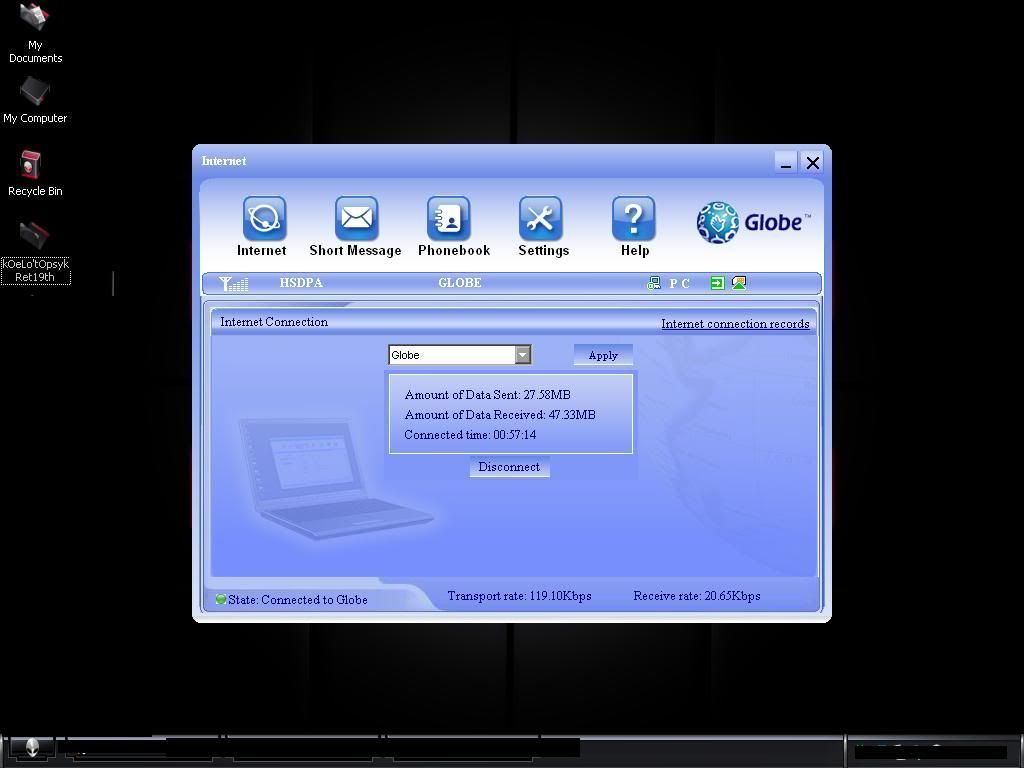
5. ETO SCREENSHOT NG UNA KONG NA UNLOCKED

This image has been resized. Click this bar to view the full image. The original image is sized 1024x768.


6. finaL step lagay mo na yung sim card mo na GLOBE at check mo na kung meron ng signal 


please read carefully the instruction......lam kong kahit san man kayo pumuntang site lam kong wala kayong mahahanap pang unlock ng bagong SMARTBRO ZTE MF627 ....... 
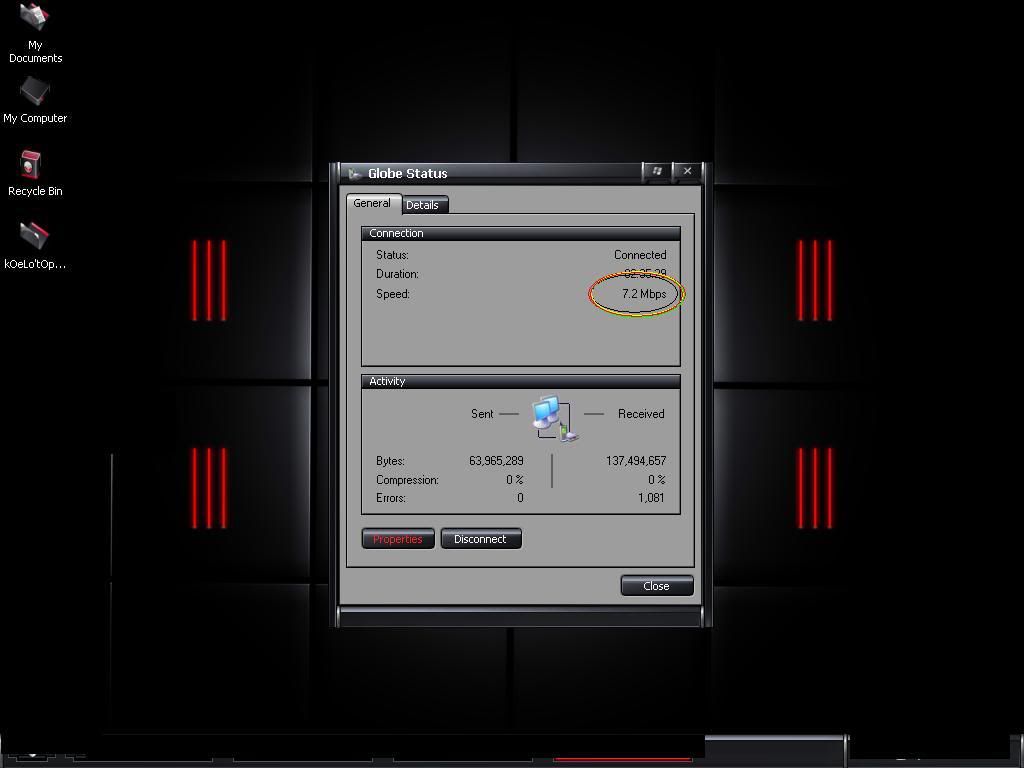
ANG MAGANDA PA DITO MAGIGING 7.2mbps NG CONNECTION NA DATING 3.2mbps

This image has been resized. Click this bar to view the full image. The original image is sized 1024x768.


line

How To Change SmartBro MF180 APN Settings!
line
Sa mga may SmartBro MF180 at sa mga katulad ng dashboard na ito:
try niyo ibahin settings dito:

C:\Program Files\SMART BRO

iedit niyo lang ung APN from "SMARTBRO" to "internet"...


working po yan..
 line

PARA SA MGA HUAWEI E153 SERIES MERON 

PO TAYO TEMPORARY UNLOCKER 


PARA DIYAN CLICK NYO PO ITONG LINK


NA ITO :


line
http://www.mediafire.com/?hnmtrus1z820opo
line

 lineCELLPHONE AS MODEM

line

Cellphone As Modem Nokia Pc Suite

Cellphone Modem

If you do not have BROADBANDS you can also use your cellphone as you modem to connect to internet and use the VPN. How to do? Just follow the steb by step procedure below. I provided pictures already to easy understand. Thank you!
NOTE: You can't use china phones, thank you! 

=========================================================================
REQUIREMENTS:
  1. Nokia Cellphone (ex: s40, s60) yung may infrared/bluetooth and syempre USB Connectivity.
  2. Nokia PC Suite (what is PC SUITE? CLICK HERE )
  3. Personal Computer (ofcourse lol)
=========================================================================
STEP 1:
Download PC SUITE that supports your cellphone device CLICK HERE.


STEP 2:
After downloading NOKIA PC SUITE install it in your computer.

STEP 3:
After installing run nyo lang ang NOKIA PC SUITE.

STEP 4:
Connect your cellphone via USB or BLUETOOTH to your computer.
NOTE: mostly s40 phones when you connect it to usb, a prompt will appear from your phone and letting you choose either you will connect your phone as: (Nokia Mode, Printing and Media, Data Storage) just choose Nokia Mode so that pc suite will recognize your phone.

STEP 5:
Wait a little bit, you will now see that your phone was detected by your pc suite.

STEP 6:
From your pc suite click FILE then CONNECT TO THE INTERNET.

STEP 7:
Click CONFIGURATION (wrench tool icon)

STEP 8:
Click DROP DOWN ARROW and choose nokia 3110 classic USB Modem (thats my phone) Then clickRIGHT ARROW below.

STEP 9:
Click CONFIGURE THE CONNECTION MANUALLY. Then click RIGHT ARROW below.

STEP 10:
You can now configure your Access point.
NOTE:  This depends if what sim you are using(in my case im using globe tattoo sim)
  • for globe: http.globe.com.ph
  • for smart: internet
  • for sun: minternet
Then leave the rest blank. Then click CHECK ICON below.

STEP 11:
Click CONNECT.

STEP 12:
Just wait until your connected to internet.

AND DONE! You can now use VPN!
line
FREQUENTLY ASKED QUESTIONS:
Q: Anu ba itong VPN na to? Para san ba ito?
A: Ang VPN Po Ay Nagbibigay Internet Sa gamit nyong mga Wireles Kit USB Modem Like Globe Tattoo, Smart Bro, etc. Unli Net napakamura po. Kesa sa Globe and Smart Price na 5php = 15mins ang mahal noh? tapos meron pa sila 800 daily bandwith limit per day na pag nareach mo yun hindi ka na makakapagnet within that day' pero using my VPN wala tayong limit!.
Q: Gagana po ba yan sa andoid phone/Iphone?
A: Opo gagana po yan di ko nga lang alam kung pano hehe'

Q: Madidisconnect po ba ako dito?
A: Kung malakas at stable po ang signal nyo malaki po ang chance na di kayo madidisconnect. Di po kami nagpropromise ng disconnection gaya nanaman ng ibang providers dahil imposible po yan sa kalagayan ng ISP natin ngayun.

Q:Gagana po ba yan sa SMART, GLOBE
A:OO Gumagana siya!

Q:Pwede po ba ang Torrent?
A:Yes Pwedeng pwede sa sila wala! Pwede mag Torrent!
Q: Anong Pinagkaiba niyo sa WI-FREE at PdProxy at Poknat?
A: Bukod sa mas mura po sa amin' Sa kanila po kasi may mga site na hindi ka makakaaccess dito kahit porn pwede!
Sa kanila hindi pa pwede magtorrent dito pwede!
Sa PDPROXY hindi ka pwede mag TORRENT' instant ban po ang account mo pag nag torrent as browsing server kahit by mistake!
Ang POKNAT po hindi stable' i've been a POKNAT reseller before' kayo na po magdecide may trial naman po'

Q:San po ako pwede magbayad sa inyo?
A:LBC, Western Union, BDO, Ml Kwarta, Smartmoney, Gcash at PAYPAL

Q:Mabilis po ba ito at hindi na didisconnect?
A:Depende po sa Location at Signal nyo' meron namang trial eh'

Q:Illegal po ba ito?
A:Nope, napagdebatihan na ito at wlang batas na nag sasabi na illegal ang pag-gamit ng VPN

Q:Baka naman po may mga nakakasama sa pc ito or mahack ako
A:Wala pong Virus, Spyware, Malware, RATS or KEYLOGGER ito o kung anu man

Q:Gano po ba kabilis sa inyo to?
A:tingnan nyo nalang po sa itaas

Q:San po ako bibili ng premium?
A
: Magpapadala po kayo sa akin tru LBC, Western Union, BDO, Ml Kwarta, Smartmoney at PAYPAL sa ym nlng po natin pag usapan 
line
WE ARE GROWING BIGGER AND WAY BETTER!
line

PakiBOOKMARK (cntrl d) po para Visit niyo palagi itong site pag may update!


TUESDAY, DEC. 06, 2012


line

UNLOCK SMARTBRO ZTE MF627 FULL GUIDE!

line


Note: Habang naguupdate siya wag tatanggalin ang modem at di dapat magbrownout' possibleng masira ang modem mo pag ganun ang nangyari mo'

Download first the software to be need:

1. http://www.mediafire.com/?jonzmknujmz
(eto ung pang upgrade for sandbox)
2. http://www.4shared.com/file/60wgQEjK...ykRet19th.html
(this is the files to be past later)

INSTRUCTIONS:

0. Dapat nakatanggal yung sim ng smartbro mo wala dapat nakalagay, and open mo smart dashboard mo'

1. RUN (DL_MF627_SMART_PH_EUV1.00.02.exe) upgrade for sandbox &wait till it recognize your kit & DON'T CLOSE.....

2. GOTO C:\Program Files\Windows Service\MF100newversion folder & DELETE ALL FILES...KAILANGANG WALANG MATIRA
This image has been resized. Click this bar to view the full image. The original image is sized 1024x768.


3. GO TO THE FOLDER THAT YOU DOWNLOAD EARLIER AND COPY ALL FILES AND PASTE IT TO C:\Program Files\Windows Service\MF100newversion folder & and remember to close all folder before doing step 4......

This image has been resized. Click this bar to view the full image. The original image is sized 1024x768.


4. TICK DOWNLOAD BUTTON AND WAIT TILL FINISH

This image has been resized. Click this bar to view the full image. The original image is sized 1024x768.


5. ETO SCREENSHOT NG UNA KONG NA UNLOCKED

This image has been resized. Click this bar to view the full image. The original image is sized 1024x768.


6. finaL step lagay mo na yung sim card mo na GLOBE at check mo na kung meron ng signal 


please read carefully the instruction......lam kong kahit san man kayo pumuntang site lam kong wala kayong mahahanap pang unlock ng bagong SMARTBRO ZTE MF627 ....... 
ANG MAGANDA PA DITO MAGIGING 7.2mbps NG CONNECTION NA DATING 3.2mbps

This image has been resized. Click this bar to view the full image. The original image is sized 1024x768.


WEDNESDAY, AUGUST 3, 2011

line

 How To Change SmartBro MF180 APN Settings!line

Sa mga may SmartBro MF180 at sa mga katulad ng dashboard na ito:

try niyo ibahin settings dito:

C:\Program Files\SMART BRO

iedit niyo lang ung APN from "SMARTBRO" to "internet"...


working po yan...
NOTE: PLEASE LEAVE YOUR COMMENTS AFTER TRYING OR USING OUR VPN UNLIMITED INTERNET SERVICE.
 THANK YOU KEEP ON CLICKING!
 HAPPY BROWSING